
Fancy Text Generator
Click here for More Advanced Fancy Text Generator
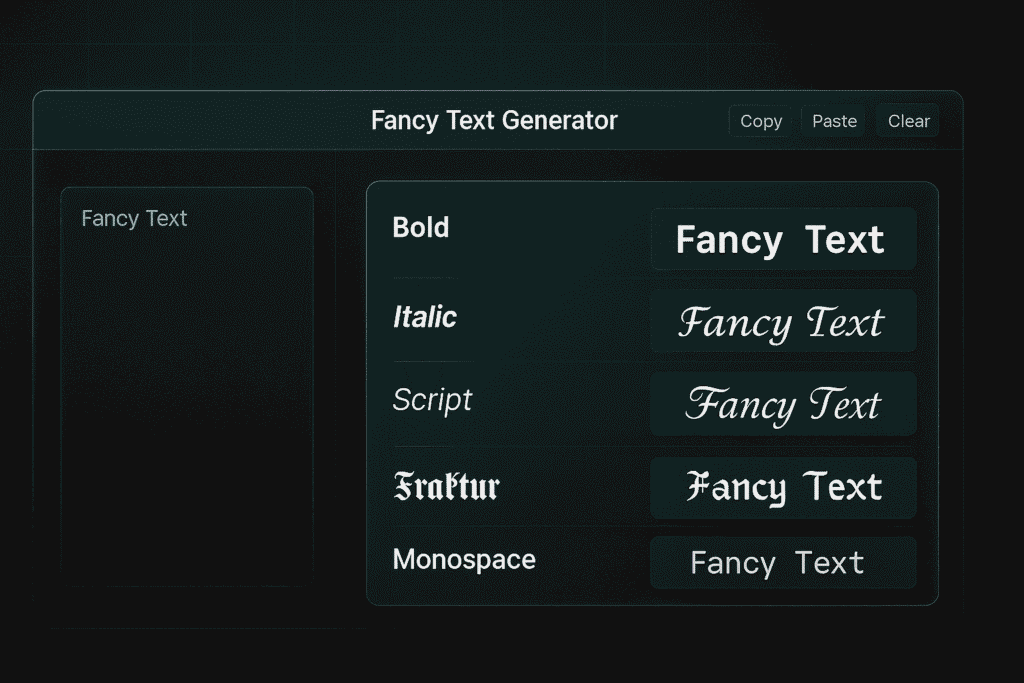
Fancy Text Generator – Simple, Fast, Copy-Paste Guide
A fancy text generator turns normal letters into stylish text. You type. It shows many styles. You click Copy. You paste anywhere. It is that simple.
What is a fancy text generator?
It is a small web tool. It changes plain characters into Unicode symbols. These symbols look like cool fonts. But they are text, not images. They work in most apps and browsers.
Why use a fancy text generator?
You want your words to stand out. Fancy text helps your bio, caption, name, or status pop. It is quick. It needs no design skill. You can copy and paste in seconds.
Where can I use fancy text?
You can use it on Instagram bios, captions, and stories. You can use it on Facebook posts and names. You can use it on TikTok, YouTube titles, and comments. You can use it on Twitter/X, WhatsApp, Telegram, and Discord. You can use it in game names like Fortnite, PUBG, Free Fire, and Roblox. You can use it on Minecraft signs and server names. You can also use it in emails and documents, but test first.
How does it work (in simple words)?
The tool maps A-Z and 0-9 into styled Unicode sets. Examples include bold, italic, script, fraktur, monospace, and small caps. These are not pictures. They are real characters. That is why you can copy and paste them like normal text.
Quick steps to use it
- Type your text in the input box.
- See many styles appear instantly.
- Pick a style that you like.
- Click Copy near that style.
- Paste it into your app or site.
Examples you can copy now
- 𝓕𝓪𝓷𝓬𝔂 𝓣𝓮𝔁𝓽 𝓖𝓮𝓷𝓮𝓻𝓪𝓽𝓸𝓻
- 𝔉𝔞𝔫𝔠𝔶 𝔗𝔢𝔵𝔱 𝔊𝔢𝔫𝔢𝔯𝔞𝔱𝔬𝔯
- 𝐅𝐚𝐧𝐜𝐲 𝐓𝐞𝐱𝐭 𝐆𝐞𝐧𝐞𝐫𝐚𝐭𝐨𝐫
- 𝘍𝘢𝘯𝘤𝘺 𝘛𝘦𝘹𝘵 𝘎𝘦𝘯𝘦𝘳𝘢𝘵𝘰𝘳
- 𝗙𝗮𝗻𝗰𝘆 𝗧𝗲𝘅𝘁 𝗚𝗲𝗻𝗲𝗿𝗮𝘁𝗼𝗿
- 𝙁𝙖𝙣𝙘𝙮 𝙏𝙚𝙭𝙩 𝙂𝙚𝙣𝙚𝙧𝙖𝙩𝙤𝙧
- 𝚆𝚒𝚝𝚑 𝙼𝚘𝚗𝚘𝚜𝚙𝚊𝚌𝚎 𝚅𝚒𝚋𝚎𝚜
- ꜰᴀɴᴄʏ ᴛᴇxᴛ ɢᴇɴᴇʀᴀᴛᴏʀ
- ғαη¢у тєχт γενεραтορ
- FΛПᄃY TΣXT GΣПΣЯΛTOP
- ᶠᵃⁿᶜʸ ᵗᵉˣᵗ ᵍᵉⁿᵉʳᵃᵗᵒʳ
- 𝒇𝒂𝒏𝒄𝒚 𝒕𝒆𝒙𝒕 𝒈𝒆𝒏𝒆𝒓𝒂𝒕𝒐𝒓
- 𝖋𝖆𝖓𝖈𝖞 𝖙𝖊𝖝𝖙 𝖌𝖊𝖓𝖊𝖗𝖆𝖙𝖔𝖗
- ʄąŋƈყ ɬɛҳɬ ɠɛŋɛཞąɬơཞ
- 𝐟𝐚𝐧𝐜𝐲 𝐭𝐞𝐱𝐭 • 𝐪𝐮𝐢𝐜𝐤 • 𝐬𝐭𝐲𝐥𝐞
Tip: If one style does not look right, try another. Different phones show styles in different ways.
Good use cases and quick ideas
- Instagram bio: Add one fancy line for your name. Keep the rest clean.
- Captions: Use a bold or italic style for the hook. Keep the body normal.
- Discord nickname: Pick a readable style. Avoid overly curly sets.
- Game IDs: Choose a sharp, bold look. Test visibility in the lobby.
- YouTube titles: Use fancy words for one or two key phrases only.
- WhatsApp status: A short fancy quote works well.
- Email subject (rare): Test with coworkers first. Some mail clients break symbols.
Simple best practices
- Keep it readable. Do not overuse curls and loops.
- Mix normal text and fancy text. Use fancy text for emphasis only.
- Avoid long all-caps in harsh styles. It looks noisy.
- Test on your device and a friend’s device.
- Make sure the pasted text keeps meaning.
- Keep important info in plain text for safety.
Short rules for profiles and bios
- Put your name in a simple fancy style.
- Add one fancy separator like • or | .
- Keep links in normal text for easy tapping.
- Use emojis with fancy text for balance.
- Keep it short. Short lines look better.
Keyboard and workflow tips
- Save favorite styles in a note.
- Use copy buttons near each style.
- Keep common phrases ready, like “Follow me” or “New Video Out.”
- On desktop, use Ctrl/Cmd+C and Ctrl/Cmd+V.
- On mobile, long-press to paste.
Compatibility notes
Most modern apps support these characters. But some parts may not. Old devices may show boxes or question marks. Some platforms block certain symbols in names. If a style fails, switch styles. Bold and monospace sets are often the safest.
SEO and content tips (short and simple)
Fancy text can draw the eye. Use it for headings on social posts or thumbnails. But keep the main article or caption in standard text. Search engines read plain text better. Balance style with clarity.
Safety and moderation
Avoid using confusing characters to impersonate someone. Follow platform rules. Do not hide harmful text with fancy symbols. Keep it friendly and clean.
Troubleshooting quick fixes
- Text looks like squares: That device does not support the set. Try bold or sans styles.
- Name rejected: The platform blocks those characters. Pick a simpler set.
- Spacing issues: Some sets change spacing. Add spaces manually.
- Copy fails on mobile: Tap and hold the output. Then choose Copy.
- Different look across phones: That is normal. Try a widely supported style.
Short list of popular styles
- Bold serif for strong titles.
- Italic for gentle emphasis.
- Bold italic for punchy hooks.
- Script for classy signatures.
- Fraktur for gothic moods.
- Monospace for tech or code vibes.
- Small caps for neat labels.
Do and don’t list
Do
- Use fancy text to highlight key words.
- Keep most of your message in normal text.
- Test on the app where you will paste.
- Save your top three styles for quick reuse.
Don’t
- Paste a full paragraph in hard-to-read styles.
- Use fancy text for URLs or emails.
- Mix too many styles in one line.
- Use styles that break on your audience’s devices.
Quick templates you can copy
Instagram Bio
𝐍𝐚𝐦𝐞 • Creator | 𝘛𝘪𝘱𝘴 & 𝘛𝘰𝘰𝘭𝘴 • ✨
New video ↓
YouTube Title
How to Design a 𝐂𝐥𝐞𝐚𝐧 𝐋𝐨𝐠𝐨 (Step by Step)
Discord Nickname
𝙉𝙞𝙠 | 𝙋𝙧𝙤
Game Name
FΛПᄃY•X
WhatsApp Status
𝑲𝒆𝒆𝒑 𝒊𝒕 𝒔𝒊𝒎𝒑𝒍𝒆.
Extra examples for quick copy
- 𝓒𝓸𝓸𝓵 𝓒𝓪𝓹𝓽𝓲𝓸𝓷 𝓘𝓭𝓮𝓪𝓼
- 𝙉𝙚𝙬 𝙑𝙞𝙙𝙚𝙤 𝙏𝙤𝙙𝙖𝙮!
- 𝗙𝗿𝗲𝗲 𝗧𝗼𝗼𝗹𝘀 • 𝗟𝗶𝗻𝗸 𝗶𝗻 𝗕𝗶𝗼
- ꜱɪᴍᴘʟᴇ ᴀɴᴅ ᴄʟᴇᴀɴ
- ʟ𝚎𝚝’𝚜 𝚐𝚘!
- 𝖌𝖆𝖒𝖊 𝖔𝖓 • 𝖋𝖔𝖈𝖚𝖘 𝖍𝖆𝖗𝖉
Final thoughts
Fancy text is a simple way to add style. Use it to lift a word or a short line. Keep the rest plain. Test it before posting. Pick two or three styles you love. Then use them often. Your feed will look clean and strong.
FAQs
What is a fancy text generator?
It is a tool that converts normal letters into stylish Unicode text. You can copy the result and paste it anywhere.
Is the fancy text generator free?
Yes. Most tools are free. They run in the browser. No install is needed.
Will fancy text work in all apps?
It works in most modern apps. Some places block special characters. If it fails, try a simpler style.
Why do some styles show as boxes?
The device or font does not support those characters. Use bold, italic, or monospace sets instead.
Can I use fancy text in my Instagram name?
Yes, but keep it readable. Some very complex styles may be rejected or look broken on some phones.
Is this the same as a font?
No. It is still text, not a graphic font file. But it looks like different fonts because it uses special Unicode characters.
Can I use fancy text in emails?
Sometimes. Many email clients support it, but some do not. Send a test email first.
Will this help my SEO?
Fancy text can draw attention in social posts. But for websites, search engines prefer plain text. Use fancy text sparingly.
Can I make a long paragraph in fancy text?
You can, but it is hard to read. Use fancy text for short parts only, like headings or hooks.
How do I copy and paste on mobile?
Tap and hold on the output style. Choose Copy. Then tap and hold where you want to paste. Choose Paste.
Is there any risk in using fancy text?
There is no direct risk. But do not impersonate others. Follow platform rules. Make sure your message stays clear.
Which styles are the most compatible?
Bold, italic, bold italic, and monospace sets are widely supported. Script and fraktur look great but may fail on older devices.
This article is related to fancy text generator, cool text generator, stylish text, Unicode text, copy paste fonts, fancy letters copy paste, text symbol generator, aesthetic text, font changer online, Instagram font generator, Twitter/X bio fonts, WhatsApp stylish text, Telegram stylish text, Discord font generator, YouTube title fonts, game name fonts, PUBG name style, Free Fire name style, Roblox name fonts, Minecraft text, bold italic text, small caps generator, monospace text, script text generator.
And also related to cursive text generator, gothic text generator, fraktur text, bubble text generator, square text, tiny text generator, upside down text, reverse text tool, vaporwave text, fancy symbols, cute symbols, emoji text, kaomoji text, decorative text, nickname fonts, username fonts, social media fonts, text formatter, Unicode converter, fancy font app, handwriting font style, calligraphy text, fancy caption ideas, stylish bio ideas, copy and paste letters.
If you have any issue while accessing this page, please Contact Us from here